

The report is the only part of a penetration test most people in your company will ever see. Developers fix from it, managers budget from it, and auditors and customers judge your security by it. A test can be excellent and still fail if the report is vague.
This guide walks through a penetration test report section by section, shows a redacted sample finding, and gives you a checklist for judging any report, whether you are reading one now or choosing a provider.
The sections of a penetration test report
A good report has two audiences: people who decide, and people who fix. It serves both without making either read the other’s part.
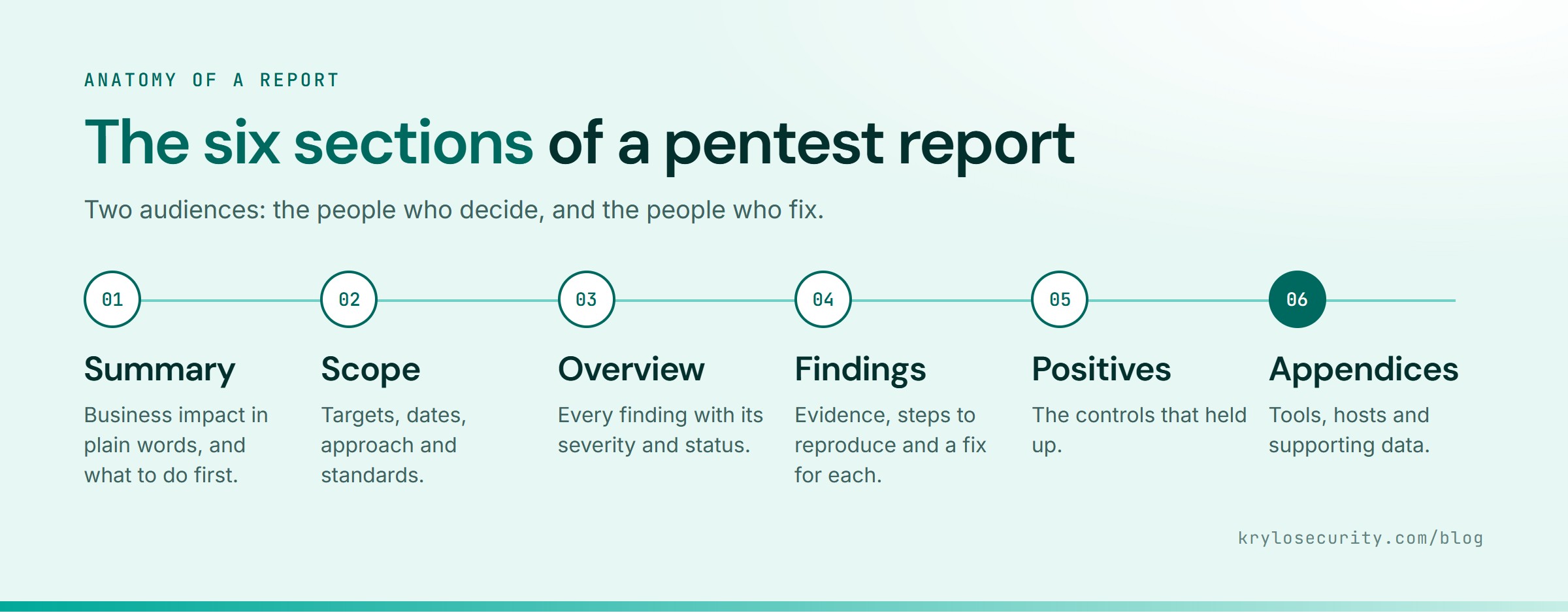
1. Executive summary
One or two pages, in plain language. It should answer four questions:
- What was tested, and when?
- How exposed are we overall?
- What are the few issues that matter most, and what could an attacker do with them?
- What should we do first?
A sentence like “an attacker with a free customer account could download other customers’ invoices” is worth more than a chart of severity counts. The best summaries name business impact, not vulnerability classes.
2. Scope and approach
This is the section auditors read first. It should state:
- the exact targets: domains, IP ranges, applications, API endpoints, app builds,
- what was out of scope,
- the testing dates and environment (staging or production),
- the approach: black box, grey box or white box, and which accounts were provided,
- the standards followed, such as OWASP WSTG, the OWASP API Top 10, PTES or NIST SP 800-115,
- any limitations, such as a feature that was down during testing.
If the scope is vague, the report is weak evidence, however good the findings are.
3. Findings summary
A table of every finding with its ID, title, severity and status. Severities are usually based on CVSS, sometimes adjusted for your environment. Read our guide to CVSS scores if the numbers look arbitrary.
4. Detailed findings
The core of the report. Each finding should be self-contained, so it can be pasted into a ticket and fixed by someone who never read the rest. A complete finding has:
- title that says what is wrong in plain words,
- severity with the scoring behind it,
- affected asset: the exact URL, endpoint, host or app screen,
- description of the weakness,
- impact: what an attacker could actually do, in business terms,
- steps to reproduce, so your team can confirm it and later confirm the fix,
- evidence: requests and responses or screenshots, with sensitive data redacted,
- remediation: a fix written for your stack, not a generic link,
- references, such as the OWASP category or CWE.
5. Positive observations
What held up. If the tester could not break your MFA or your file upload handling, say so. It tells you which controls are earning their keep.
6. Appendices
Tools used, the list of hosts or endpoints tested, and any raw data that supports the findings without cluttering them.
A sample finding
Here is what one finding looks like when it is written well. The details are illustrative and redacted.
KS-04: Customers can download other customers’ statements
Severity: High (CVSS 4.0: 8.7)
Affected asset:
GET /api/v2/statements/{statementId}/downloadDescription: The endpoint returns a statement for any ID it receives. It checks that the caller is signed in, but not that the statement belongs to them.
Impact: Any customer can download any other customer’s monthly statements, which include names, addresses, account numbers and transactions. Statement IDs are sequential, so all of them can be collected with a simple script.
Steps to reproduce: Sign in as test user A and download one of A’s statements, noting its ID. Sign in as test user B and request A’s statement ID. The statement is returned with HTTP 200.
Remediation: On the server, look up the statement together with the signed-in customer’s ID and return 404 if they do not match. Apply the same check to every endpoint that takes an object ID. Consider non-sequential identifiers as a second layer, not a replacement.
Reference: OWASP API Security Top 10, API1:2023 Broken Object Level Authorization
Notice what it avoids: no scanner jargon, no “may allow”, no copy-pasted paragraph about IDOR in general. A developer can fix it in an afternoon, and a manager can understand why it matters. For more on this class of bug, see our guide to broken access control examples.
Checklist: is this a good report?
Use this when you receive a report, or ask a provider for a sample before you buy one:
- The executive summary names business impact, with counts as support.
- The scope lists exact targets, dates and approach.
- Every finding has steps to reproduce and evidence.
- Remediation is specific to your technology.
- Each severity comes with the reasoning behind it.
- There is no unverified scanner output padding the findings.
- Sensitive data in the evidence is redacted.
- Critical issues were reported to you during testing, not first in the report.
- A retest report is available once you have fixed the issues.
What auditors and customers look for
If the report is going to a SOC 2 auditor, a PCI assessor or a customer’s security team, they will check three things before reading a single finding:
- Independence. The testers did not build or run the systems they tested.
- Scope match. The scope covers the systems in their audit boundary or contract.
- Remediation evidence. High and critical findings were fixed and retested, or have a documented plan.
Our page on penetration testing for compliance covers what each framework expects.
Frequently asked questions
Can I get a penetration test report template?
The structure above is the template: executive summary, scope and approach, findings summary, detailed findings, positive observations and appendices. What makes a report good is the quality of each finding, which a template cannot give you.
Should we share the full report with customers?
Usually not. Share an attestation letter or the executive summary and scope, under NDA. The detailed findings are a guide to your weaknesses, so keep them inside the team that fixes them.
How long after testing should the report arrive?
Most providers deliver within one to two weeks of testing ending. Critical issues should reach you during testing, not in the report.
What is a VAPT report?
The same thing under a different name. VAPT stands for vulnerability assessment and penetration testing, and the report covers both the scanning and the manual testing. See vulnerability assessment vs penetration testing.
See our reports for yourself
Every Krylo Security report follows this structure, and every finding in it has been reproduced by a tester. Ask us what your report will include when you book your scoping call, or read how we run the whole process.